A3 Application architecture & deployment
This chapter shows how the review application is built, how it runs the separately installed matching engine, and how both are deployed with Docker Compose. Read it before operating a deployment or changing anything that crosses the boundary between the two projects. Terms such as result bundle and dataset profile are defined in the glossary.
The system at a glance
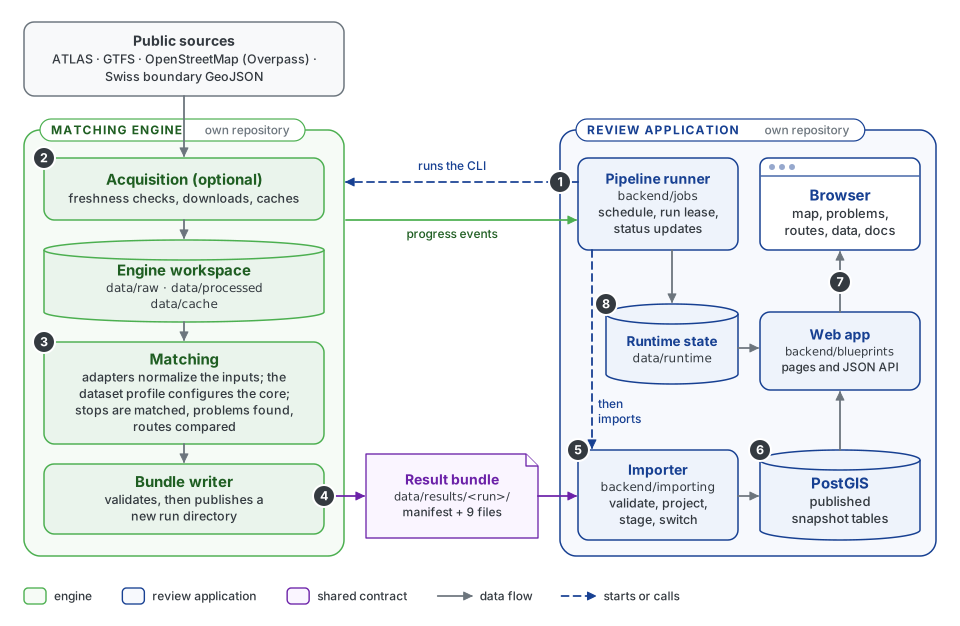
The engine (green) and the review application (navy) are separate repositories; the result bundle (purple) is the contract between them. Follow the numbers:
- The pipeline runner in the scheduler container starts the engine's command-line tool,
osm-public-transport-matcher, as a separate process, and reads the progress events it prints. - The engine's acquisition layer checks whether ATLAS, GTFS and the Swiss boundary changed, downloads what is new and downloads a fresh OSM extract. Verified downloads and prepared products are cached in the engine workspace.
- Matching reads the workspace files through format adapters, applies the Swiss dataset profile, matches stops, detects problems and compares routes. The adapters read the files; the matching core itself never touches files, the network or a database.
- The bundle writer validates the complete result and publishes a new directory under
data/results/<run>/. - The runner then calls the importer in its own process. It validates the bundle independently and loads it into a private staging schema.
- One short transaction switches the staged tables into the public schema of PostGIS. Until then, readers see the previous snapshot.
- The web app serves pages and a JSON API from the published snapshot to reviewers' browsers.
- Run status and the run lease are kept as runtime state files, which the web app reads to show live pipeline progress.
A1.1 details steps 5 and 6, A3.3 and A3.5 steps 1 and 8, and the engine chapters E1 to E4 steps 2 to 4.
The boundary between engine and application
The engine and the review application are separate repositories with separate releases, tests and dependencies. They are developed side by side as sibling checkouts.
| Matching engine | Review application | |
|---|---|---|
| Repository | openTdataCH/osm-public-transport-matcher | openTdataCH/stop_sync_osm_atlas |
| Package or service | Python package osm-public-transport-matcher, with the command of the same name |
Flask website with its scheduler and database |
| Local checkout | engine/, beside the application checkout |
stop_sync_osm_atlas/ |
| Does | Acquisition, input parsing, stop and route matching, problem detection, result bundles | Scheduling, bundle import, PostGIS, web API, map and review pages, reports |
| Depends on | NumPy and SciPy; optional extras add pandas, DuckDB and geospatial libraries | Flask, SQLAlchemy, PostgreSQL/PostGIS |
| Documentation | E1–E6 | A1–A4 |
| Release history | Matching engine changelog | Review application changelog; a change to the result bundle appears in both |
Only three things cross the boundary, and each is versioned or documented:
| Connection | Direction | Form | Contract |
|---|---|---|---|
| CLI call | application → engine | osm-public-transport-matcher swiss, started as a separate process |
Command-line options of the engine |
| Progress events | engine → application | JSON lines on standard output with progress_schema_version: 2; other output is only logged |
E5.3 Progress contract |
| Result bundle | engine → application | A directory with manifest.json and nine record files |
Result bundle format |
The scheduler starts the engine without the database credentials, so the engine cannot reach the application database even when both run in one container; A3.3 shows the command for each run mode.
The code follows these dependency rules, which static checks in make quality enforce:
- The engine imports no
backend, Flask or SQLAlchemy code, and the application imports noosm_public_transport_matchercode. The application's importer implements the published bundle format independently. - Inside the engine, the matching core receives normalized records, per-run state and an explicit profile. It reads no files, environment variables or databases.
- Format adapters parse explicit input files; network downloads live in a separate, optional acquisition layer.
- Swiss specifics, such as SLOIDs, the GTFS-to-ATLAS identity mapping, duplicate groups and route-year codes, belong to the Swiss integration and profile, not to the core.
- The engine ships only curated, maintained adapters. Other datasets can use external adapters that implement its public adapter contract, without changes to the engine repository.
Deployment
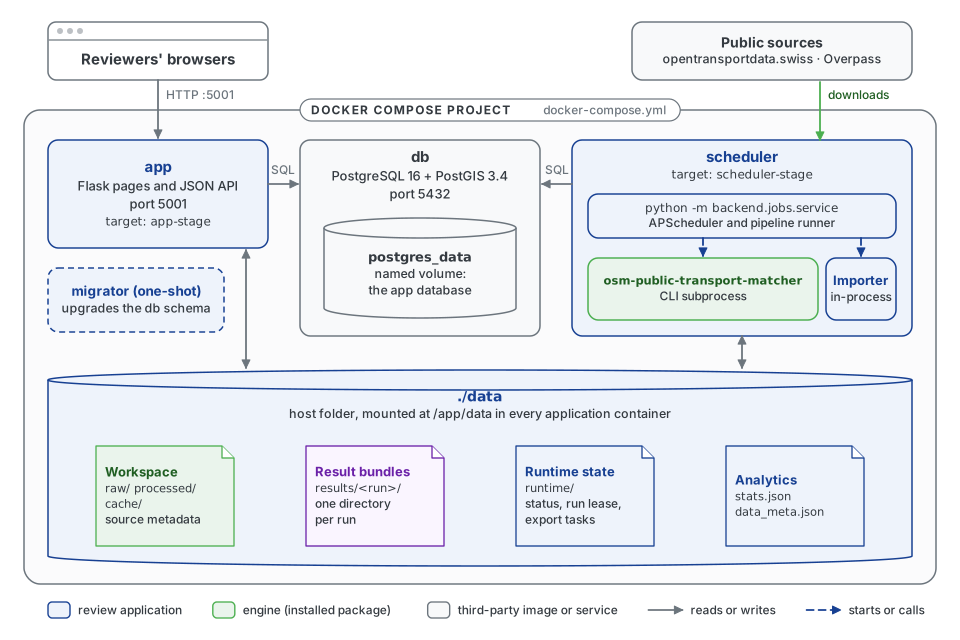
docker-compose.yml defines these services, builds them from the dockerfile stages and mounts the source tree for development.
| Service | Built from | Runs | Restart |
|---|---|---|---|
db |
postgis/postgis:16-3.4 |
PostgreSQL 16 with PostGIS 3.4 on port 5432; data in the postgres_data volume |
unless stopped |
migrator |
app-stage |
python [backend/importing/init.py](https://github.com/openTdataCH/stop_sync_osm_atlas/blob/main/matching_and_import_db/database/init.py) && flask db upgrade: waits for the database, applies the Alembic migrations, exits |
no |
app |
app-stage |
Flask on port 5001: the debug server when FLASK_DEBUG=1, otherwise Gunicorn with two workers |
unless stopped |
scheduler |
scheduler-stage |
python -m backend.jobs.service: APScheduler, the pipeline runner and importer, and the installed engine CLI |
unless stopped |
The app and scheduler services start only after db is healthy and migrator has finished. Restart policies recover crashed processes; they are not a production high-availability design.
The Compose defaults are for local development: FLASK_DEBUG=1 runs Flask's debug server, the database password is a placeholder, and PostgreSQL's port is published on the host. For a public deployment, set FLASK_DEBUG=0, choose credentials in .env, and do not publish port 5432. Compose passes the settings from .env or the shell to every container.
The host folder ./data is mounted at /app/data in the app, scheduler and migrator containers. The containers run in /app, the mounted checkout, which is therefore the scheduler's engine workspace (PIPELINE_WORKSPACE), so the engine's files land in the same folder:
Path below data/ |
Written by | Read by | Contents |
|---|---|---|---|
raw/, processed/, cache/, source_metadata.json |
engine acquisition | engine | Downloaded sources, prepared products, cache metadata |
results/<run>/ |
engine bundle writer | importer | The immutable result bundle of the published run (PIPELINE_BUNDLE_DIR); the runner deletes those of earlier runs (A3.3) |
runtime/ |
runner, scheduler, web app | web app, scheduler | Pipeline status, run lease, export tasks (STATE_DIR) |
stats.json, data_meta.json |
importer, runner | web app | Analytics and metadata of the published snapshot |
gtfs_atlas_stats.json |
importer | engine, when source_metadata.json lacks the GTFS identity statistics |
A copy of the bundle's GTFS identity statistics |
Builds pin the engine to one commit: Docker receives the verified sibling checkout as a named build context. A3.1 explains the image stages, version identifiers and the upgrade procedure.
Deployment without Docker
A server that runs the processes directly needs Python 3.11 or newer (CI tests 3.13), Git, the system libraries that WeasyPrint draws PDFs with (Pango 1.44 or newer and HarfBuzz; on Debian libpango-1.0-0 libpangoft2-1.0-0 libharfbuzz-subset0), and PostgreSQL with PostGIS. After every checkout of a release tag, scripts/install_server.sh installs the checkout, run as the user the services run as and with DATABASE_URI set:
- It checks out the engine at the commit in
engine.refintoengine/, so the documentation portal shows the engine's pages, version and source links of that commit. - It installs
requirements.txtand that engine, with itsswissandacquisitionextras, into one virtualenv,.venv/(VENVchanges it), and stops if WeasyPrint cannot load its system libraries. - It waits for the database and applies the migrations.
Running it again changes nothing that is already in place. The services then run from the checkout, which is their working directory and therefore the engine workspace:
| Service | Command |
|---|---|
| Website | .venv/bin/gunicorn -w 2 -b 0.0.0.0:5001 backend.app:app |
| Scheduler | .venv/bin/python -m backend.jobs.service |
The scheduler finds the engine command in the same virtualenv, so MATCHER_COMMAND stays unset. The service user writes data/, .cache/ (the code quality evidence) and documentation/generated/ (the PDFs, and the documentation diagrams CI rendered for the commit, downloaded on the first PDF export). Git lists the engine checkout as the untracked folder engine/; that is expected.
Settings
Every setting is an environment variable with a default in the code. Docker Compose passes the ones set in .env or the shell to its containers; a server without Docker sets them in the environment of its services, and the website, the scheduler, install_server.sh and any command run by hand must all get the same ones. Each setting is explained, with its default, on the page that uses it:
| Settings | What they control | Explained in |
|---|---|---|
DATABASE_URI |
The PostgreSQL database, for example postgresql+psycopg://user:password@host:5432/import_db. The only setting without a usable default on a server; Compose points it at its db container |
Deployment without Docker |
FLASK_DEBUG |
Compose only: 1, its default, runs Flask's debug server, 0 runs Gunicorn |
Deployment |
REVIEW_CONFIG |
Website title, labels and map area; by default the Swiss configuration | Presentation configuration |
FORCE_HTTPS, RATELIMIT_STORAGE_URI, WEB_DB_CONNECT_TIMEOUT_SECONDS, WEB_DB_LOCK_TIMEOUT_MS, WEB_DB_STATEMENT_TIMEOUT_MS |
HTTPS redirection, rate-limit counters, database time limits of web requests | A3.2 |
STATE_DIR |
The folder of the pipeline status, run lease and export tasks, data/runtime. The website and the scheduler must share it |
A3.3 |
PIPELINE_*, MATCHER_COMMAND, OVERPASS_API_URL |
Schedule, runs, the engine command and its workspace | A3.3 |
DB_IMPORT_BATCH_SIZE |
Rows per bulk operation of the import | A1.1 |
GTFS_PROCESSING_BACKEND, GTFS_THREADS, GTFS_MEMORY_LIMIT |
The engine's GTFS processing; Compose raises the memory budget to 1536MB |
E5.2 |
APP_REVISION |
The commit the site runs, when the code is no Git clone | A4.4 |
DOCS_GITHUB_BLOB_BASE |
Where the documentation links application files | A2.8 |
ENGINE_DIR |
Development only: the engine checkout that Docker builds from and the quality checks use | A4.4 |
Who owns which state
- Engine: matching state is created fresh for each call; nothing is shared between runs. The acquisition workspace holds source caches with their fingerprints and HTTP validators.
- Application: the database tables and their migrations, the runtime state under
data/runtime, asynchronous exports and the presentation settings.
The application stores no human-review decisions.
Presentation configuration and matching policy
Two kinds of configuration exist, and they never affect each other:
| Review configuration | Dataset profile | |
|---|---|---|
| Changes | What the website shows | How stops are matched |
| Where | A JSON file named by REVIEW_CONFIG |
Python code in the engine (MatchingProfile) |
| Examples | config/switzerland.json, config/gtfs-example.json |
profiles.SWITZERLAND, the generic default |
| Contains | Title, flag, source and identifier labels, link template, map centre, zoom and bounds, enabled views, route-search normalization | Reference rules, rule order, OSM grouping, distance and priority thresholds |
A view is enabled only when the review configuration enables it and the active bundle has the matching capability (routes, gtfs_identity). A bundle without routes therefore never shows an empty route page.
Swiss names in the database
The result bundle is source-neutral. The application's tables and code use Swiss names, such as atlas_stops and sloid, for the stop registry of any dataset. The route side is called gtfs (gtfs_line_families, line_families.source = 'gtfs'), because the engine builds it from a GTFS feed in every mode. backend/importing/projection.py is the one place that maps the bundle's neutral records onto these names; they do not mean that the application parses ATLAS. A generic GTFS bundle works with the generic presentation, and Swiss-only views stay hidden through capabilities.
The table names are internal to the application: the bundle format does not depend on them.