0.2 Comparing routes
The Routes menu shows which lines of the timetable are mapped in OSM, and where their stops differ. It has three tabs: the lines of the timetable and OSM, the OSM routes outside the timetable, and the link between timetable stops and ATLAS platforms.
Lines and variants
Both sources describe public transport on two levels, a line and its variants, and the site compares them level by level.
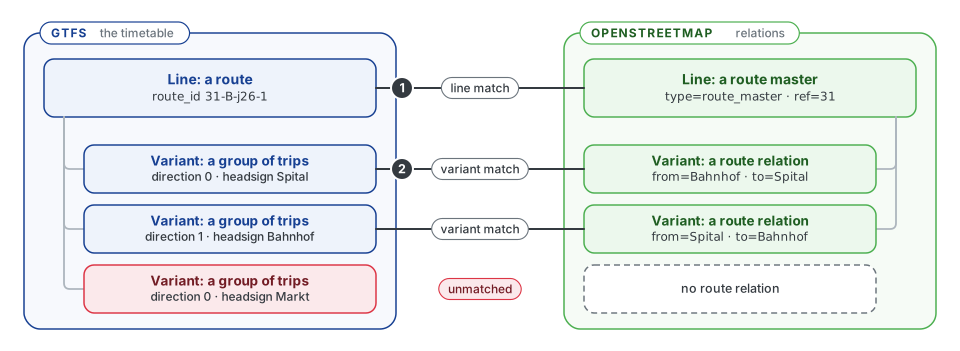
| GTFS timetable | OpenStreetMap | |
|---|---|---|
| Line | A route, identified by its route_id |
A route master: a relation tagged type=route_master that groups the route relations of the line |
| Variant | The trips of the route that share a direction and a headsign | One route relation (type=route): one direction or stop pattern of the line, with its stops in order |
The site matches the lines first (1), then pairs the variants of two matched lines (2). A variant without a counterpart stays unmatched, like the short run to Markt in the figure. Route relations without a route master still form a line: they are grouped by their gtfs:route_id, or by their line number, operator and network.
The glossary and the developer pages call a line a line family and a variant an itinerary.
Read a line card
The Routes tab shows one card per matched pair of lines and one per line without a match. The screenshots on this page follow one line, the S10 of the Uetlibergbahn, as an example.
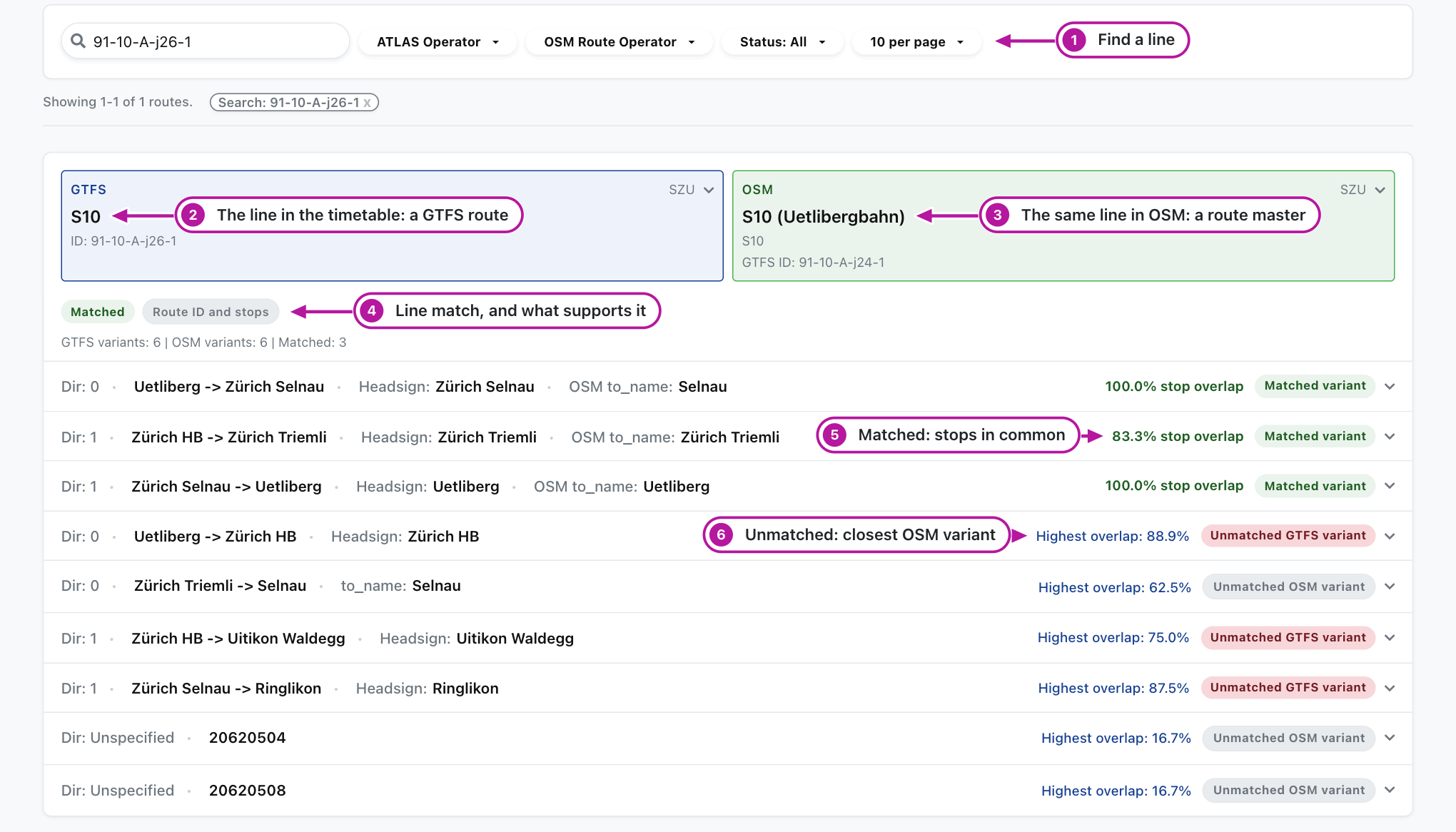
Look at the numbers in the picture:
- Search and filters. Find a line by its GTFS or OSM route ID, by operator, or by status: Matched, Unmatched GTFS or Unmatched OSM.
- The line in the timetable, a GTFS route. Click it for its details.
- The same line in OSM, a route master. Click it for its details and a link to the route master.
- The line match. Whether the lines are matched, and what supports the match: the route ID and the stops, the stops, or the route ID alone. Check a match by the route ID alone first, because the stops do not confirm it.
- A matched variant (green). The stop overlap is the share of stops both variants serve in the same order.
- An unmatched variant (blue). The Highest overlap is that of its closest variant on the other side; hover to see which. It is a hint, not a match. No shared stops means that no variant on the other side serves any of its stops.
Open a variant
Click a variant row to compare its stops. The two stop lists are aligned in route order, beside a map of the stops.
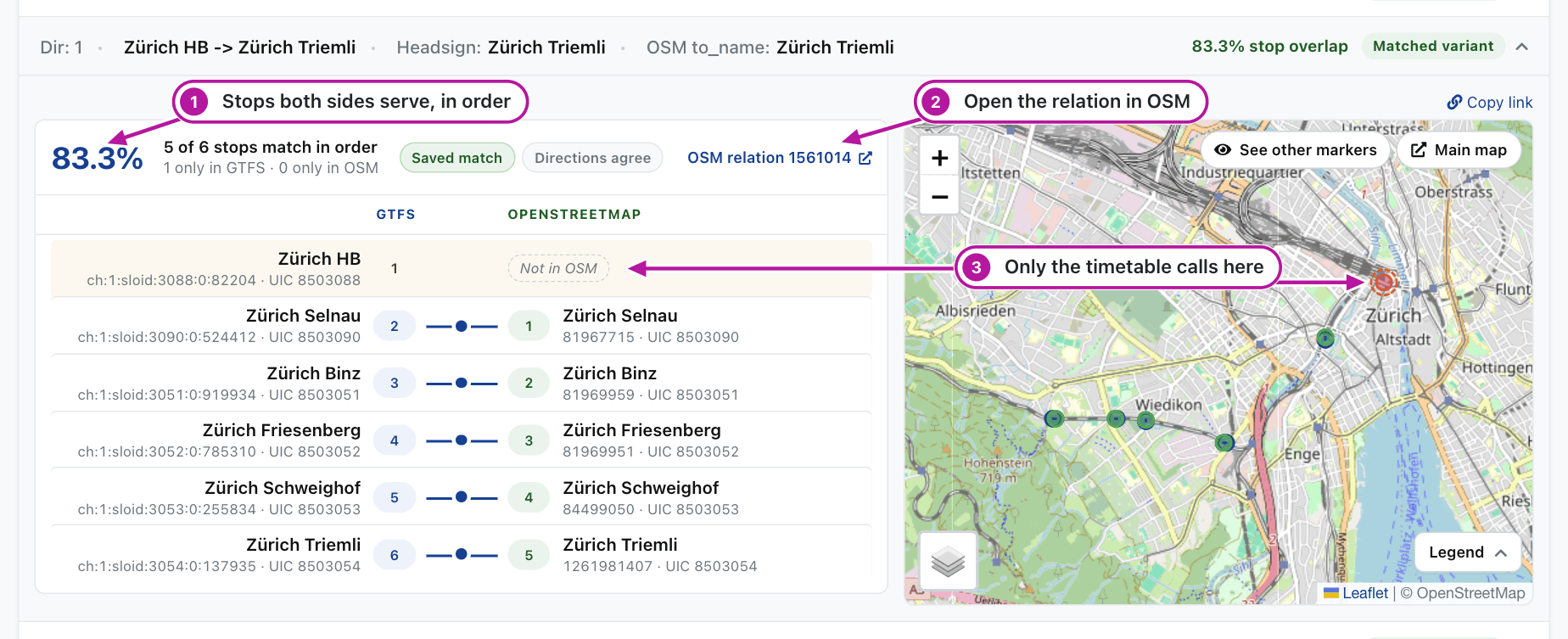
Look at the numbers in the picture:
- The overlap of the two variants, with the number of stops that match in order and of those only one side has.
- OSM relation opens the variant's route relation in OSM.
- A stop only one side serves. In this example the timetable's train starts at Zürich HB and the OSM relation one stop later. The list marks such a stop Not in OSM or Not in GTFS, and the map circles it with a dashed ring. The list also marks a stop that the sides serve at different platforms of one station.
A low overlap or a Not in OSM row is a lead: the relation may miss a stop, call at another platform, or follow an older route. Check it before you edit the relation.
Compare an unmatched variant
Two variants are paired when they share at least 80% of the longer stop list in order and their directions do not disagree, and each variant is paired once. An unmatched variant opens beside its closest variant of the other side; the picker above the lists changes the variant to compare with.
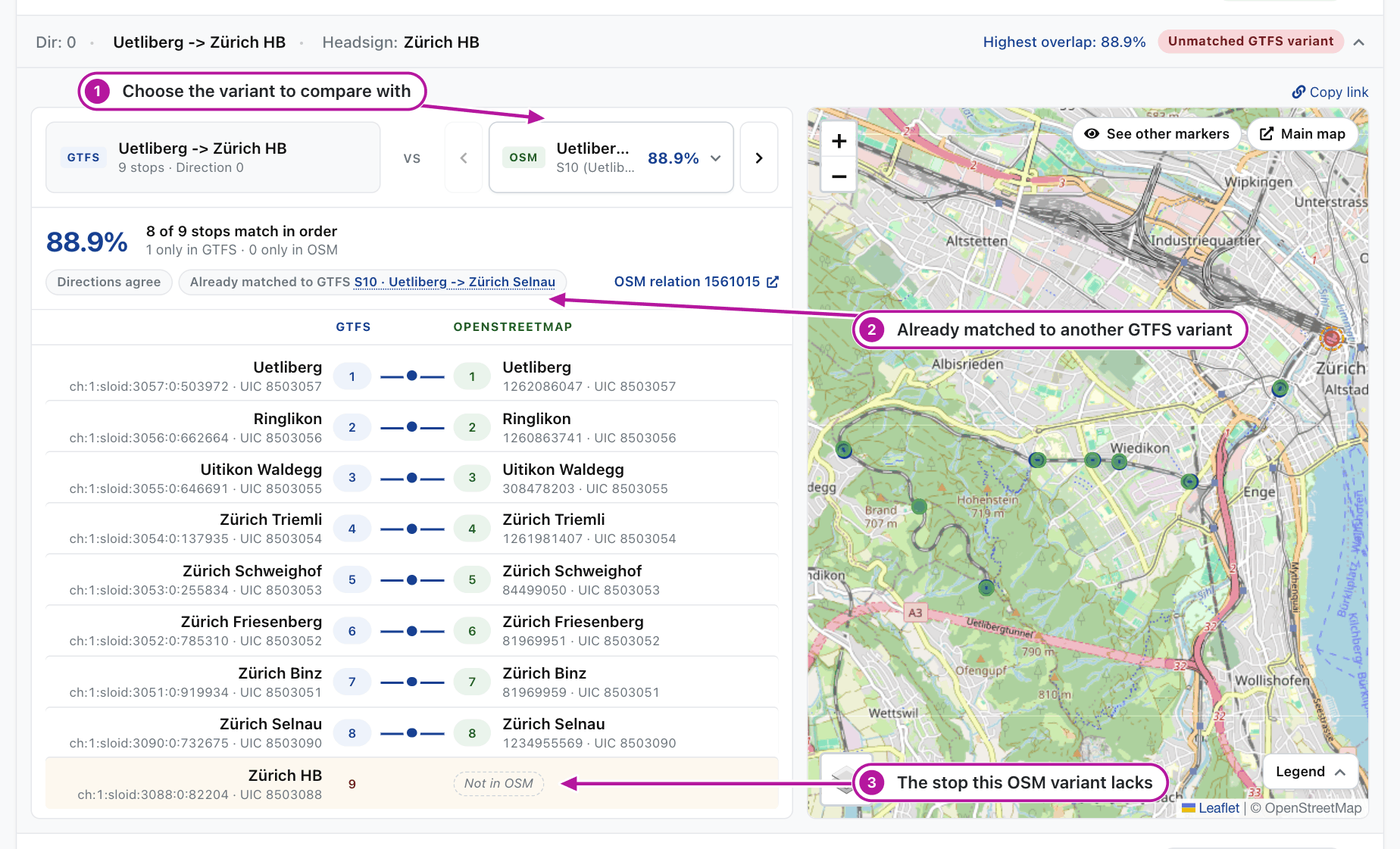
Look at the numbers in the picture:
- The picker lists the variants of the other side by overlap. Choose one to compare with it.
- Already matched says that the compared variant is paired with another variant, here the GTFS variant that ends at Zürich Selnau.
- The stop that differs. In this example the timetable's run goes on to Zürich HB, and its closest OSM variant ends one stop earlier.
An unmatched GTFS variant is a lead of the same kind: OSM may lack a relation for it, as for the longer run here, or the stops of an existing relation may differ.
Lines with several matches
A line can have several matches, and each is a card of its own. The timetable can split one line into several routes, for example one per operator, and OSM maps the line once: the card then says This OSM line is also matched to GTFS route …. When a card says This GTFS route is also matched to OSM line …, OSM holds the line twice or in two parts, which is worth checking: its relations may belong in one route master.
E3.2 explains why a line stays unmatched.
Non-GTFS routes
The Non-GTFS routes tab lists OSM routes that are not in the Swiss timetable, such as FlixBus lines. They are never matched.
Timetable stops and ATLAS platforms
The SLOID ↔ GTFS stop_id tab shows which ATLAS platform each timetable stop is linked to. That link tells the site which lines serve each platform. Blue marks an ATLAS platform with a timetable stop, orange a timetable stop with a platform, red a platform without a timetable stop and grey a timetable stop without a platform. A wrong link here is not fixed in OSM.
Related pages
- E3.2 Route-route matching: how lines and their variants are paired
- A2.6 Routes pages: how the Routes pages are built